Instagram Comment-to-DM Automation: How It Works and How to Use It
How 'comment a keyword to get the link in your DMs' automation works on Instagram, how to set up a good campaign, and the mistakes to avoid.

4 min read


In this article6 sections
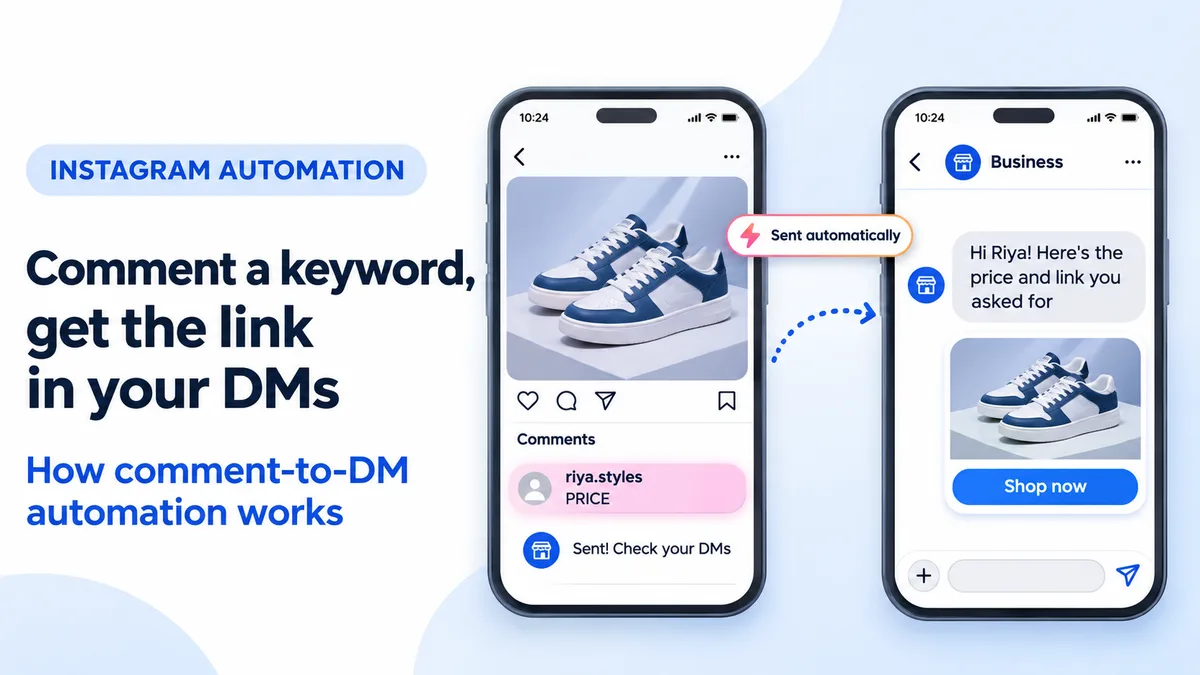
You've probably seen posts that say "Comment PRICE and we'll DM you the details." That's comment-to-DM automation: when someone comments a chosen keyword on your post or reel, they automatically get a direct message with the link, price list or offer they asked for.
Done well, it turns a post into a steady source of leads. Here's how it works and how to run it properly.
How it works#
- You publish a post or reel and ask people to comment a keyword, such as
PRICE,LINKorGUIDE. - A tool connected to your Instagram professional account through Meta's official API watches for that keyword in comments.
- When someone comments it, the tool sends them a private message with what you promised, and can optionally reply publicly to the comment too ("Sent! Check your DMs 📩").
- If they reply in the DM, the conversation continues: an AI assistant can answer questions, or your team can take over.
You need an Instagram professional account (Business or Creator) and a tool that uses Meta's official API. Avoid tools that ask for your Instagram password; they risk your account.
Why it works#
- Commenting is easy. Typing one word is less effort than visiting a link in your bio.
- The person starts the conversation. You're replying to a request, not sending cold messages.
- You get a lead. Every comment becomes a DM conversation you can follow up.
- It can help your post's reach. More comments are a sign of engagement.
How to set up a good campaign#
1. Offer something genuinely useful#
People comment when the reward is clear and worth it:
- A price list or catalogue
- A discount code
- A free guide, checklist or template
- A booking link for a free consultation
- The link to a product shown in a reel
2. Pick a simple keyword#
Use one short, memorable word related to the offer: PRICE, MENU, DEMO, GUIDE. Mention it clearly in the caption and on the video or image itself.
3. Write a helpful first DM#
The first message should deliver what you promised immediately, then invite a next step.
Hi Ananya! 👋 Here's our full price list: [link]
Want help choosing the right package? Reply with your budget and we'll suggest the best option.
4. Plan what happens next#
Most of the value comes after the first DM. Decide in advance:
- Which common questions the assistant should answer automatically
- What details to collect (name, phone number, requirement)
- When to hand the chat to a person, and who that is
5. Move serious leads to WhatsApp or a call#
Many customers, especially in India, prefer to continue on WhatsApp. Offer a WhatsApp link in your DM for people ready to buy. Create one with our free WhatsApp Link Generator.
Mistakes to avoid#
- Promising one thing and sending another. If people comment for a price list, send the price list, not a sales pitch.
- Sending too many follow-ups. One helpful follow-up is fine; repeated messages feel like spam.
- Leaving hot leads with a bot. Make sure a human sees conversations from people ready to buy.
- Breaking Instagram's rules. Only message people who interacted with you, use approved tools, and don't use automation to spam.
- Forgetting to measure. Track how many comments turned into conversations, leads and sales.
Ideas by business type#
| Business | Keyword | What they get |
|---|---|---|
| Coaching institute | FEES |
Fee structure and batch dates |
| Restaurant | MENU |
Menu and table booking link |
| Real estate | PRICE |
Price sheet and site-visit booking |
| Salon | OFFER |
This month's offer and booking link |
| Online store | LINK |
Product link and discount code |
Go further than one reply#
Comment-to-DM is the start of the conversation, not the end. NextAIBot's Instagram automation handles comment triggers and DM replies through Meta's official API, uses AI to answer follow-up questions from your business information, captures lead details, and passes ready-to-buy customers to your team in the same inbox as your WhatsApp chats. For a deeper look, read our guide on how to automate Instagram DMs.
Quick recap: offer something useful, use one clear keyword, deliver it instantly in the DM, plan the follow-up, move serious buyers to WhatsApp or a call, and never spam.
Found this useful? Share it.
Written by
NextAIBot Team
NextAIBot builds WhatsApp, Instagram and Google Business automation for growing businesses. Our team writes practical, step-by-step guides on customer messaging, reviews and lead follow-up.