WhatsApp Text Formatting: Bold, Italic, Strikethrough, Lists and More
Every WhatsApp formatting option explained with examples, plus tips for writing broadcast and offer messages people actually read.

3 min read


In this article7 sections
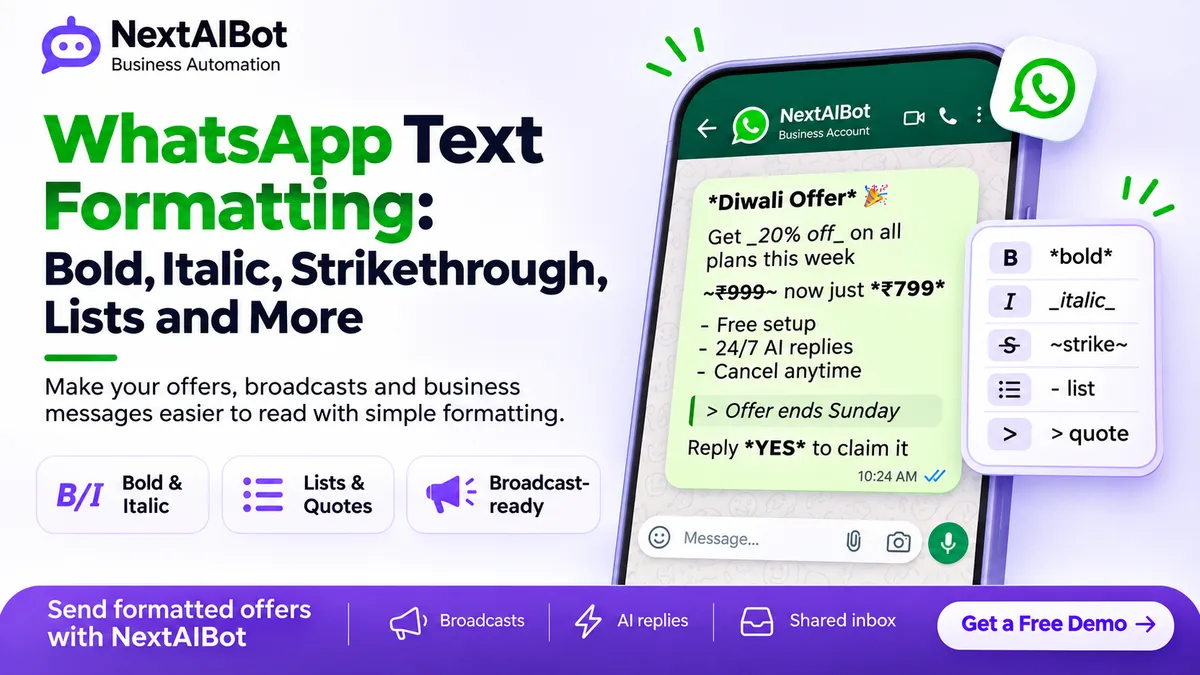
A wall of plain text is easy to ignore. A little formatting, such as a bold price, a crossed-out old price or a short list of benefits, makes your WhatsApp messages much easier to scan. This matters most for offers and broadcasts, where you have a second or two to get attention.
Here's every formatting option WhatsApp supports and how to use each one well.
All WhatsApp formatting options#
| Style | Type this | You get |
|---|---|---|
| Bold | *text* |
text |
| Italic | _text_ |
text |
| Strikethrough | ~text~ |
|
| Monospace | ```text``` |
text in a fixed-width font |
| Inline code | `text` |
highlighted text |
| Bulleted list | - item or * item at the start of a line |
• item |
| Numbered list | 1. item at the start of a line |
1. item |
| Quote | > text at the start of a line |
an indented quote |
These work in WhatsApp, WhatsApp Business and WhatsApp Web, on Android, iPhone and desktop.
Rules that make formatting work#
Most "formatting not working" problems come from one of these:
- No spaces inside the symbols.
*Sale*works;* Sale *does not. - Symbols must wrap the whole word or phrase.
*50% off*works. - Lists and quotes need a space after the symbol and must start at the beginning of a line:
- Free delivery, not-Free delivery. - You can combine styles.
*_Limited offer_*gives bold italic.
You can also format without typing symbols: on your phone, type the message, select the text, and choose Bold, Italic, Strikethrough or Monospace from the menu that appears.
Preview before you send#
It's easy to miss a symbol and end up with stray asterisks in a message to hundreds of customers. Our free WhatsApp Text Formatter shows a live WhatsApp-style preview as you type. Select text, click a style, then copy the finished message.
How to format an offer message#
Compare these two messages.
Plain:
Diwali offer get 20% off on all plans this week was 999 now 799 free setup 24/7 support cancel anytime offer ends Sunday reply yes to claim
Formatted:
*Diwali Offer* 🎉

Get _20% off_ on all plans this week.
~₹999~ now just *₹799*

- Free setup
- 24/7 AI replies
- Cancel anytime

> Offer ends Sunday

Reply *YES* to claim it.
The second version can be understood in two seconds: what the offer is, the price, the benefits, the deadline and what to do next.
Formatting tips for business messages#
- Bold only what matters. The offer name, price and call to action. If everything is bold, nothing stands out.
- Use strikethrough for old prices.
~₹999~ *₹799*shows the saving instantly. - Use lists for benefits or steps. They're much easier to scan on a small screen.
- Use a quote for deadlines or important notes, so they stand out from the rest.
- Keep paragraphs to one or two lines. Leave a blank line between sections.
- End with one clear action, such as "Reply YES", "Tap the link" or "Call us".
- Go easy on emojis. One or two help; ten look like spam.
Formatting in WhatsApp Business API templates#
If you send broadcasts through the WhatsApp Business API, the same formatting works inside your message templates. Templates must be approved by Meta before you use them, so format them carefully before submitting. You can personalise each message with variables such as the customer's name.
Send formatted offers to all your customers#
Formatting makes a message readable; sending it to the right people at the right time makes it profitable. With NextAIBot's WhatsApp broadcast you can send approved, formatted messages to your opted-in contacts, personalise each one, and handle every reply from one shared inbox, with AI answering common questions instantly.
Quick recap: *bold*, _italic_, ~strike~, ```mono```, - lists, 1. numbered lists and > quotes. No spaces inside the symbols, bold only what matters, and preview before you send.
Found this useful? Share it.
Written by
NextAIBot Team
NextAIBot builds WhatsApp, Instagram and Google Business automation for growing businesses. Our team writes practical, step-by-step guides on customer messaging, reviews and lead follow-up.