How to Create a WhatsApp Link (wa.me) With a Pre-filled Message
Step-by-step guide to making a WhatsApp click-to-chat link and QR code for your business, plus where to use it to get more enquiries.

4 min read


In this article8 sections
Most customers would rather send a WhatsApp message than fill in a form or make a call. A WhatsApp click-to-chat link removes the last bit of friction: one tap opens a chat with your business, without the customer saving your number first.
This guide shows you how to build the link correctly, add a ready-made message, turn it into a QR code, and where to place it so it actually brings in enquiries.
What is a wa.me link?#
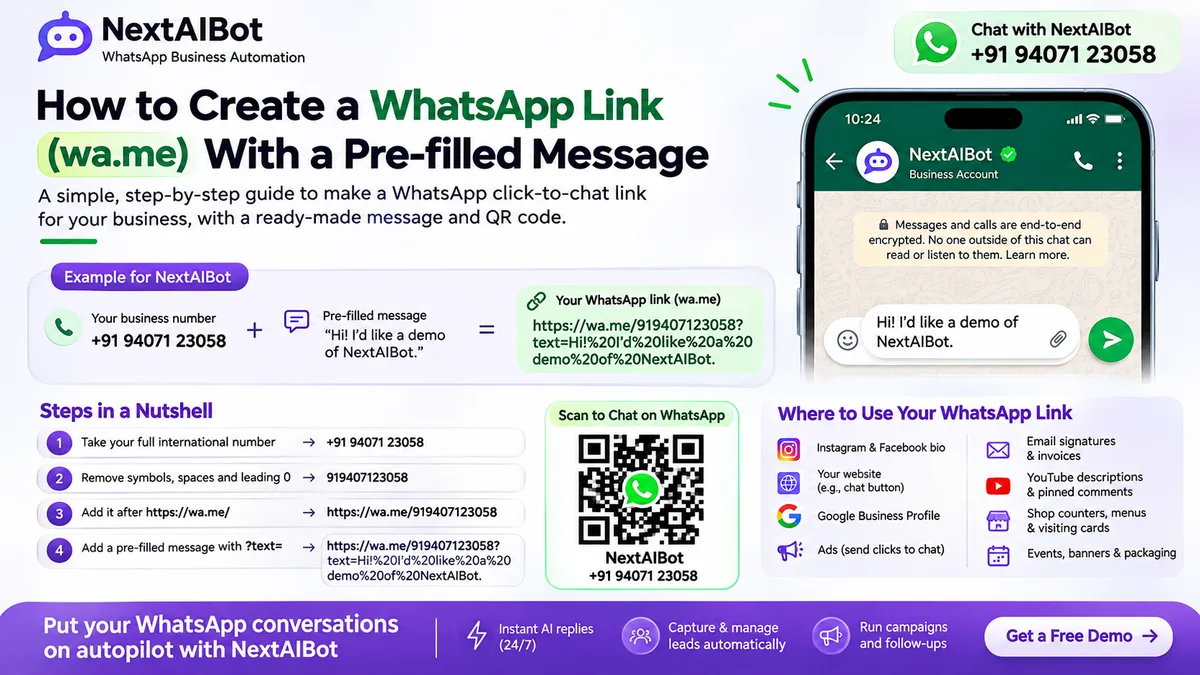
A wa.me link is an official WhatsApp short link in this format:
https://wa.me/919876543210
When someone opens it on a phone, the WhatsApp app opens a chat with that number. On a laptop it opens WhatsApp Web or the desktop app. It works with both the regular WhatsApp app and WhatsApp Business.
How to build the link by hand#
- Start with your full international number. Include the country code, for example
91for India. - Remove everything that isn't a digit. No
+, no spaces, no brackets, no dashes, and no leading0. - Add it after
https://wa.me/.
| You have | Use in the link |
|---|---|
| +91 98765 43210 | 919876543210 |
| 098765 43210 (India) | 919876543210 |
| +971 50 123 4567 | 971501234567 |
The most common mistake is keeping the leading zero or forgetting the country code. Either one sends the link to the wrong number, or to no number at all.
Add a pre-filled message#
You can add a message that appears already typed in the customer's chat box. Add ?text= followed by your message, URL-encoded (spaces become %20):
https://wa.me/919876543210?text=Hi!%20I%27d%20like%20to%20know%20your%20prices.
A pre-filled message helps in two ways:
- More people actually send it. The customer only has to press send, so fewer chats are abandoned.
- You know where the lead came from. Use a different message per channel, such as "Hi, I saw your Instagram post" or "Hi, I'm interested in the Diwali offer", and you can see which campaign brought each chat.
Keep it short and natural. The customer can edit it before sending.
The faster way: use a generator#
Encoding messages by hand is fiddly. Our free WhatsApp Link Generator does it for you:
- Pick your country code and enter your number.
- Type your message.
- Copy the link, or download the QR code.
It runs in your browser, needs no sign-up, and fixes common number mistakes such as a leading zero.
Turn the link into a QR code#
A QR code brings offline customers onto WhatsApp. Scanning it opens the same chat as the link. Good places to print it:
- Shop counters and billing desks
- Restaurant menus and table tents
- Visiting cards, flyers and brochures
- Product packaging and delivery bags
- Banners at events and exhibitions
Print it at least 2–3 cm wide and add a short line such as "Scan to chat with us on WhatsApp" so people know what it does.
Where to use your WhatsApp link#
- Instagram and Facebook bio. The most valuable link spot you have.
- Your website. Add a floating chat button. Our free WhatsApp chat button generator gives you copy-paste code.
- Google Business Profile. Add it as your website or booking link so people searching nearby can message you.
- Ads. Send ad clicks straight to a chat instead of a landing page form.
- Email signatures and invoices. An easy way for existing customers to get support or reorder.
- YouTube descriptions and pinned comments.
Common problems and fixes#
The link opens the wrong number. Check that the country code is there and the leading 0 is gone.
The message shows strange symbols. The text wasn't URL-encoded. Use a generator instead of typing it by hand.
"Phone number shared via URL is invalid". The number isn't registered on WhatsApp, or it has extra digits. Test the link on your own phone first.
What happens after the click matters most#
A link gets people into a chat, but leads are won or lost in the first few minutes after that. If customers message you at 11 pm and hear back the next afternoon, many will already have contacted someone else.
That's where automation helps. With the WhatsApp Business API and NextAIBot, every chat that starts from your link can get an instant AI reply, the lead's details can be captured automatically, and serious enquiries can go straight to the right person on your team, even outside business hours.
Quick recap: build the link with your full number and no symbols, add a short pre-filled message, use a QR code offline, put the link everywhere your customers already are, and make sure someone (or something) replies fast.
Found this useful? Share it.
Written by
NextAIBot Team
NextAIBot builds WhatsApp, Instagram and Google Business automation for growing businesses. Our team writes practical, step-by-step guides on customer messaging, reviews and lead follow-up.